
Configure the destination and return
1
Create the task
Choose the External task format. Write the instruction participants need and define the possible Outcomes. The stored answer is one choice from these outcomes.
2
Set the tool link
Open Tool link and enter Where respondents go. Use Insert variable for supported participant values and the return address. Include the generated return link in the parameter the external tool expects.
3
Map the result
Under How the tool reports the result, set the result parameter and the value the tool sends for each outcome. Each outcome needs a distinct value. Choose If no result comes back deliberately.
4
Save and test both directions
Follow a participant test to the actual tool and return using its configured address. Inspect the outcome stored in Responses and test any rules that read it.
ret and lang are reserved for the return flow and cannot name the result.
Verify all outcomes
Test every mapped result, an absent or unrecognized result, and a task that the participant leaves unfinished. If the returned result matches no outcome, the configured default is recorded; without a selected default, the first outcome is used. Put a meaningful fallback first or select it explicitly. Check the participant’s language and identifiers after return. Inspect the actual recorded answer before using completion of the external tool as a routing or screening condition. Keep personal values in the tool URL limited to those your workflow needs.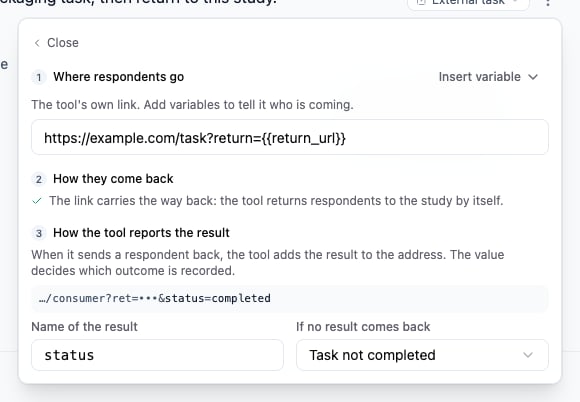
Set the external link, return address and fallback outcome together.