
Define the audience
In Audience, select the dataset and email column. Map the values each link should carry and choose a language column or a default language. Review invalid addresses, duplicate addresses, suppressed recipients and the usable count before continuing. People from another study… copies people from a study you can access in your own workspace. Choose its file or campaign audience, including the available completion filter. The copied rows belong to this study; later edits to the source do not update them. Existing opt-outs still apply.Write and review the messages
In Message, write an invitation subject and body for each audience language. Use Insert field for mapped values and inspect Preview as for a real row. Write a reminder if reminders will be used. Check its wording separately. Choose the displayed sender name, logo and email theme. The full-size preview shows the rendered email. Send a test to me sends an actual email to your account; use it when ready to review delivery. Review Include an unsubscribe link. Turning it off does not remove existing opt-outs; handling objections then falls to your organization.Choose delivery and rewards
In Sender, choose DeepField delivery, an address on your verified domain, or link export for your own sending tool. An unverified domain blocks delivery. Configure replies or explicitly choose not to receive them. In Reward, leave rewards off or configure the amount, currency, countries and available reward choices. Review the eligibility explanation and budget before proceeding. Test responses do not earn rewards; a reward campaign avoids inviting repeated rows for the same email address.Review and launch
1
Set timing
Review the time zone, start and end, sending pace, allowed hours and reminder delays. Automatic reminders require reminder text. The displayed ceiling also reflects organization and platform limits.
2
Check the final audience
Review the recipient count, languages, sender and message preview. Confirm These people can be contacted for research only after your organization has checked that condition.
3
Publish and send
Publish the study before sending live invitations, then select Send. For external delivery, choose Download links.
Follow delivery and reminders
On Fieldwork, open the campaign’s recipients to distinguish sent, delivered, failed and participant outcome states. Delivery is not completion. Read the reason for recipients not reached, including opt-outs, failed addresses, contact-spacing limits or a missing file. Use Pause and Resume to control sending. Remind can target eligible people who have not finished, including selected recipients. Review the actual recipient count and rendered subject in the confirmation. Sending remaining invitations reaches people not yet invited rather than restarting the whole audience.Check the result
Compare invited, delivered, started and completed counts. Verify one intended participant’s language, mapped values and response outcome. Keep exported personal links restricted to their intended recipients.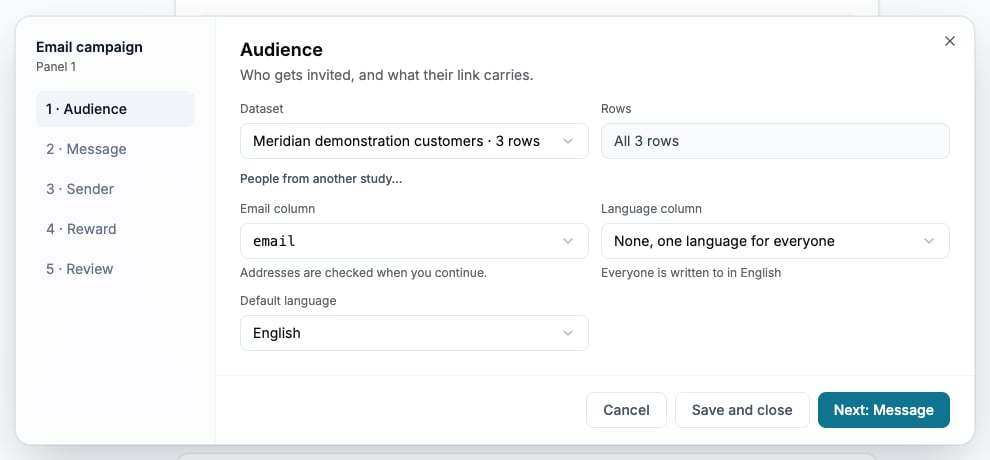
Choose the dataset, email column and recipient language before writing messages.