
Add a form
1
Choose who sees it
Select Add consent. Choose all providers or a specific provider. Add link-attribute conditions if the form applies only to certain entrants.
2
Write the content
Enter a title and the complete consent text. The participant opens the title to read the wording. Supply the source-language text and review each translation.
3
Review the standard agreement
Select Replaces the DeepField consent only if this form should replace the standard agreement for participants who see it. Otherwise both apply.
4
Save and test
Save the form, then open the relevant participant routes. Verify the forms shown for each provider, link value and language.
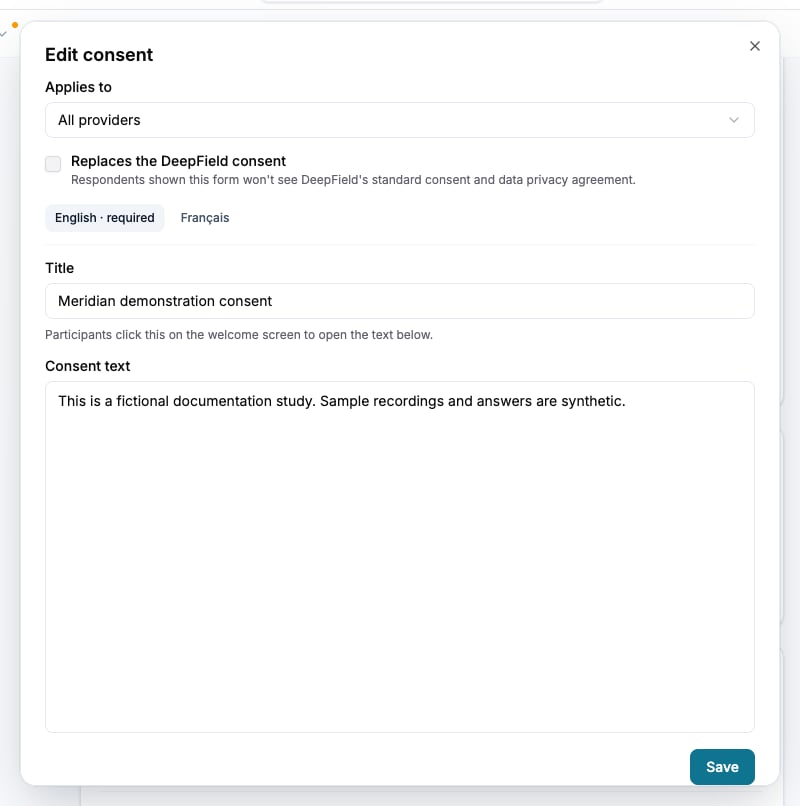
Check the provider, standard-consent replacement and wording in each language before saving.
Understand acceptance
Participants must accept the applicable forms before answering a live session. The session records the accepted forms, standard-agreement version when applicable, language and time. Editing a form retains the earlier wording in its acceptance history. Unfinished sessions can be asked to accept again when the applicable set changes; switching language alone does not require a new acceptance. Test sessions let you inspect the presentation but do not enforce live consent acceptance. Do not treat a test response as proof of a live acceptance record.Verify the record
The response workbook includes consent records and the wording of the accepted forms. Check it when you need to establish what the participant accepted. See Export response data.Check the result
Confirm that each intended route shows the correct forms and translations, that replacement of the standard agreement is deliberate, and that live acceptance records correspond to the wording shown.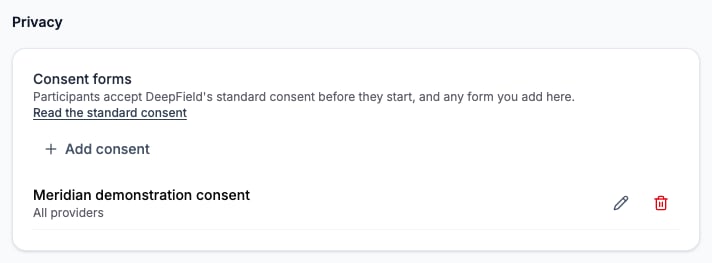
Privacy gives access to the standard consent and the study’s additional forms.