> ## Documentation Index
> Fetch the complete documentation index at: https://support.deepfield-ai.com/llms.txt
> Use this file to discover all available pages before exploring further.
# Configure a panel-provider link
> Set outcome redirects, pass provider identifiers, and distribute the invite link for each panel provider.
A provider link sends participants into the study and returns them to the provider after completion, screen-out, quality stop, or quota closure. Each link belongs to one provider: the `provider` parameter it carries is what selects the outcome URLs a participant returns through. Configure a provider before distributing any link.
Providers and links apply to a panel set to **Bring your own panel**. A panel DeepField recruits needs neither, so its provider and link settings are not shown. See [Configure your audience](/recruiting/panels-demographics).
## Before you start
Obtain the provider's outcome URLs and participant-identifier macros. Confirm which panel and languages the traffic should use.
## Add a provider
Open **Create → Quotas, panels & links** and select the panel. Under **Providers**, select **Add provider**, then enter:
* **Provider ID** — the identifier that appears on the link and selects this provider's redirects. It is fixed once saved.
* **Display Name (optional)** — optional, for your own reference.
* The four outcome redirects, described below.
A panel with no provider has no invite link. Add at least one.
 ## Add redirect URLs
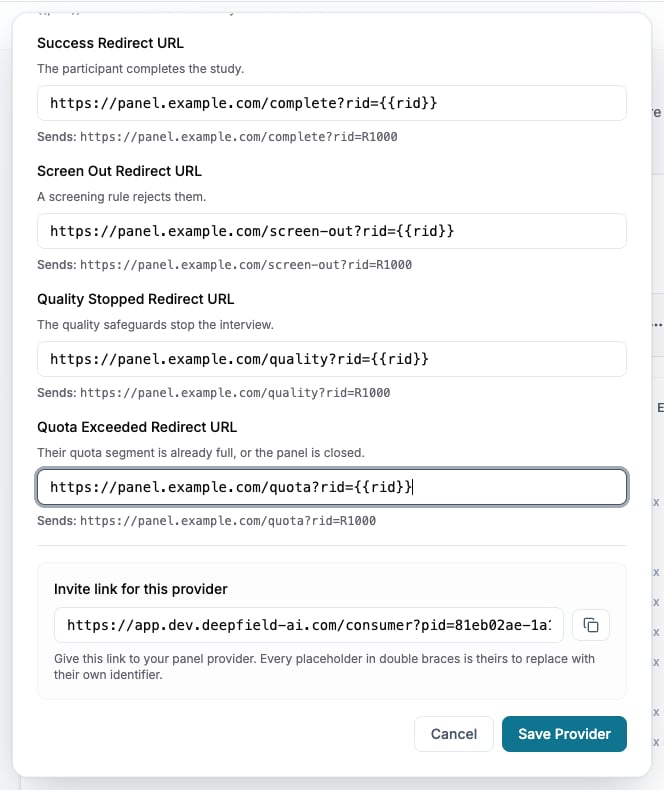
Each provider has four outcomes:
| Redirect | Used when |
| -------------------------------- | ---------------------------------------------------------------------- |
| **Success Redirect URL** | The participant completes the study or reopens a completed session. |
| **Screen Out Redirect URL** | A screening rule ends the session, or duplicate-IP protection applies. |
| **Quality Stopped Redirect URL** | The active quality controls stop the session. |
| **Quota Exceeded Redirect URL** | A matching quota or panel is full. |
Paste the URL supplied for each outcome, reviewing the generated result shown beneath every field, then select **Save Provider**.
A blank provider redirect uses the panel’s stored URL for that outcome. If neither defines a URL, the participant sees the corresponding DeepField end screen.
## Pass provider identifiers
Write a variable in a redirect as `{{name}}`. The invite link is generated from the four redirects: every external variable they reference becomes a placeholder on the link.
For example, a redirect containing `{{rid}}` and `{{psid}}` produces an invite link with placeholders for both. Give that link to the provider and ask them to replace the placeholders with their participant macros.
Built-in values are available without a provider macro:
| Variable | Value returned |
| ------------------- | ------------------------------------------------------------------------ |
| `{{respondent_id}}` | The respondent identifier supplied on entry or generated for the session |
| `{{panel_id}}` | The DeepField panel identifier |
| `{{survey_id}}` | The DeepField study identifier |
| `{{session_id}}` | The participant session identifier |
| `{{consumer_id}}` | The participant record identifier |
An external value that arrives empty is omitted from the redirect. A participant arriving with unchanged placeholder text is not accepted, because the provider identifier is unresolved.
Include the identifier required by the provider in every outcome URL. Without it, the provider may receive the participant without enough information to assign the outcome.
## Distribute the links
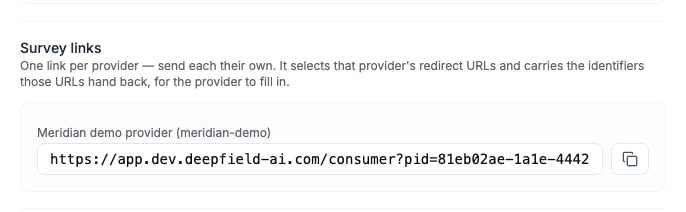
The **Survey links** section lists one invite link per provider, labelled with its name. Send each provider its own link. A provider that leaves an outcome blank falls back to the panel's stored URL for that outcome.
Before the main launch, ask each provider to send test participants through every applicable outcome and confirm that:
1. The participant enters the intended panel and language.
2. The provider identifiers appear in the return URL.
3. Completion, screen-out, quality-stop, and quota outcomes reach the correct endpoints.
4. The provider records each outcome correctly.
## Add redirect URLs
Each provider has four outcomes:
| Redirect | Used when |
| -------------------------------- | ---------------------------------------------------------------------- |
| **Success Redirect URL** | The participant completes the study or reopens a completed session. |
| **Screen Out Redirect URL** | A screening rule ends the session, or duplicate-IP protection applies. |
| **Quality Stopped Redirect URL** | The active quality controls stop the session. |
| **Quota Exceeded Redirect URL** | A matching quota or panel is full. |
Paste the URL supplied for each outcome, reviewing the generated result shown beneath every field, then select **Save Provider**.
A blank provider redirect uses the panel’s stored URL for that outcome. If neither defines a URL, the participant sees the corresponding DeepField end screen.
## Pass provider identifiers
Write a variable in a redirect as `{{name}}`. The invite link is generated from the four redirects: every external variable they reference becomes a placeholder on the link.
For example, a redirect containing `{{rid}}` and `{{psid}}` produces an invite link with placeholders for both. Give that link to the provider and ask them to replace the placeholders with their participant macros.
Built-in values are available without a provider macro:
| Variable | Value returned |
| ------------------- | ------------------------------------------------------------------------ |
| `{{respondent_id}}` | The respondent identifier supplied on entry or generated for the session |
| `{{panel_id}}` | The DeepField panel identifier |
| `{{survey_id}}` | The DeepField study identifier |
| `{{session_id}}` | The participant session identifier |
| `{{consumer_id}}` | The participant record identifier |
An external value that arrives empty is omitted from the redirect. A participant arriving with unchanged placeholder text is not accepted, because the provider identifier is unresolved.
Include the identifier required by the provider in every outcome URL. Without it, the provider may receive the participant without enough information to assign the outcome.
## Distribute the links
The **Survey links** section lists one invite link per provider, labelled with its name. Send each provider its own link. A provider that leaves an outcome blank falls back to the panel's stored URL for that outcome.
Before the main launch, ask each provider to send test participants through every applicable outcome and confirm that:
1. The participant enters the intended panel and language.
2. The provider identifiers appear in the return URL.
3. Completion, screen-out, quality-stop, and quota outcomes reach the correct endpoints.
4. The provider records each outcome correctly.
 ## Editing during fieldwork
Providers and their redirects stay editable while the study is live, so a wrong outcome URL can be corrected without touching the questionnaire. A provider cannot be removed once the study is published: its links are already in the field and its participants are recorded against it.
**Fieldwork** shows recruitment progress, launch and distribution controls, live results, and the cost summary: coding fees in credits and, for panels DeepField recruits, the recruiting fee in euros. Its **Configure link** action opens the panel in **Create → Quotas, panels & links**, where every panel setting is authored.
## Check the result
The provider confirms that each tested outcome carries the expected identifier and is recorded correctly. Recheck the link after editing a provider's redirects.
## Related
* [Test and publish a study](/recruiting/testing-publishing)
* [Configure your audience](/recruiting/panels-demographics)
* [Set quotas](/recruiting/quota-management)
* [Monitor responses](/responses/monitoring-responses)
## Editing during fieldwork
Providers and their redirects stay editable while the study is live, so a wrong outcome URL can be corrected without touching the questionnaire. A provider cannot be removed once the study is published: its links are already in the field and its participants are recorded against it.
**Fieldwork** shows recruitment progress, launch and distribution controls, live results, and the cost summary: coding fees in credits and, for panels DeepField recruits, the recruiting fee in euros. Its **Configure link** action opens the panel in **Create → Quotas, panels & links**, where every panel setting is authored.
## Check the result
The provider confirms that each tested outcome carries the expected identifier and is recorded correctly. Recheck the link after editing a provider's redirects.
## Related
* [Test and publish a study](/recruiting/testing-publishing)
* [Configure your audience](/recruiting/panels-demographics)
* [Set quotas](/recruiting/quota-management)
* [Monitor responses](/responses/monitoring-responses)