> ## Documentation Index
> Fetch the complete documentation index at: https://support.deepfield-ai.com/llms.txt
> Use this file to discover all available pages before exploring further.
# Check readiness before launch
> Verify the final questionnaire, provider outcomes and recruitment settings before sending live traffic.
Use this 30-minute session after the coding follow-up and before launch. Leave with a confirmed launch decision, or a short list of blockers with owners and a next check.
## Before the session
Finish the source-questionnaire review, resolve coding comments and run relevant participant tests. Bring audience targets, quotas, languages, consent requirements and the intended launch date. For an external panel, bring the provider’s four outcome URLs and participant-identifier macros. Include the person who can approve launch.
## Confirm questionnaire sign-off — 0–5 minutes
Compare wording, options, required answers, stimuli, screening, routing, randomization and loops with the source questionnaire. Confirm who signed off and whether review comments remain. Save pending edits and translations, clear blocking validation problems and rerun **Flow coverage** after corrections.
A clean coverage check does not replace an end-to-end participant test. Test the final saved version and repeat affected routes after an edit invalidates test links.
## Check provider outcomes — 5–17 minutes
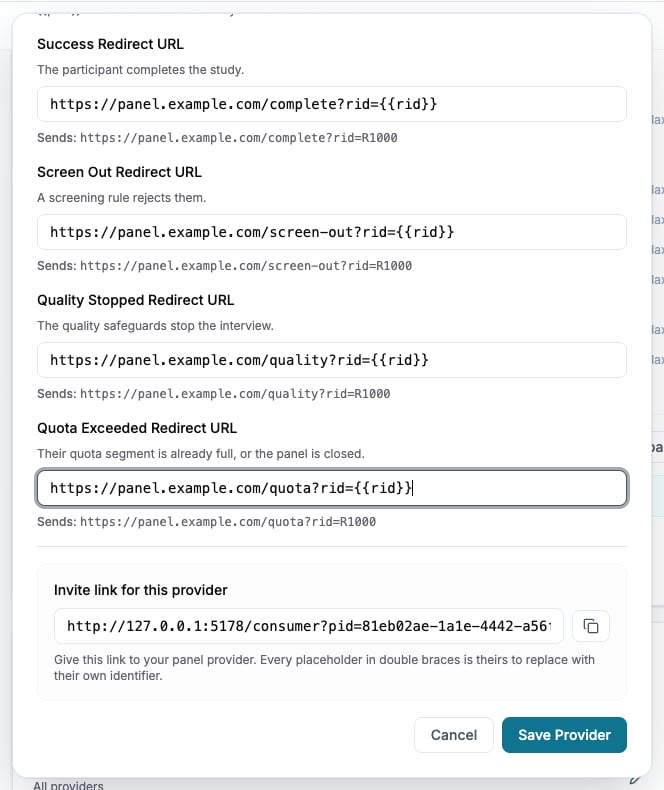
For **Bring your own panel**, open **Create → Quotas, panels & links**, choose the panel and review each provider under **Source**. Use **Add panelist** to add one. For a DeepField-recruited panel, use this time to check recruitment settings and participant tests. For a customer-file campaign, verify the audience and known personal links instead; customer-keyed files cannot be combined with panel-provider recruitment.
| Outcome field | Check |
| - | - |
| **Success Redirect URL** | Successful completion reaches the provider’s completion destination. |
| **Screen Out Redirect URL** | Screening termination records the expected outcome. |
| **Quality Stopped Redirect URL** | A stop by active quality controls reaches the correct destination. |
| **Quota Exceeded Redirect URL** | A full quota or panel records the quota outcome. |
Use the provider’s URLs and required identifiers. Inspect generated URL previews and save. An intentionally blank provider outcome falls back to the panel’s stored outcome URL, then the DeepField end screen if neither exists.
Check each provider’s own invite link using **Copy link** on its row. The provider must substitute its identifier macros; unchanged placeholder text is not a participant identifier. Test every applicable outcome and confirm panel, language, returned identifier, destination and the outcome recorded by the provider. If that confirmation is missing, assign it as a launch blocker.
 ## Run the readiness check — 17–24 minutes
* Global tests cover completion, screening, early ends and important boundary answers.
* Individual-question tests cover complex or changed questions and their dependencies.
* Relevant languages, stimuli, randomized variants, loops, desktop and mobile are checked.
* The final saved questionnaire and translations match the tested version.
* Targets, quotas, screening, quality settings and consent wording are confirmed.
* Provider outcomes and identifiers, or personal campaign links, are verified where applicable.
* Credits and the launch cost summary have been reviewed; no pending edits or validation blockers remain.
* You know where to monitor responses and how to reach FIN AI and the support team.
## Decide whether to launch — 24–30 minutes
Record **Ready** or **Blocked**, the launch owner, planned date and outstanding actions. If publishing together, review **Publish** and credit use, then confirm the study is Published before live traffic is sent. Do not declare readiness while required provider tests or questionnaire checks remain unconfirmed.
Agree who checks the first responses, screening, quotas, quality and redirect outcomes. Arrange fieldwork support if needed; otherwise plan the analytics walkthrough after fieldwork. See [Review fieldwork](/onboarding/fieldwork-check) and [Explore results](/onboarding/analysis-session).
## Check the result
The launch decision, tested outcomes, remaining actions and owners are recorded. You have an agreed launch date or next readiness check, and someone owns the first-response review.
## Related
* [Test and publish your study](/recruiting/testing-publishing)
* [Configure a panel-provider link](/recruiting/panel-links)
* [Invite participants by email](/recruiting/email-campaigns)
* [Run your fieldwork check](/onboarding/fieldwork-check)
## Run the readiness check — 17–24 minutes
* Global tests cover completion, screening, early ends and important boundary answers.
* Individual-question tests cover complex or changed questions and their dependencies.
* Relevant languages, stimuli, randomized variants, loops, desktop and mobile are checked.
* The final saved questionnaire and translations match the tested version.
* Targets, quotas, screening, quality settings and consent wording are confirmed.
* Provider outcomes and identifiers, or personal campaign links, are verified where applicable.
* Credits and the launch cost summary have been reviewed; no pending edits or validation blockers remain.
* You know where to monitor responses and how to reach FIN AI and the support team.
## Decide whether to launch — 24–30 minutes
Record **Ready** or **Blocked**, the launch owner, planned date and outstanding actions. If publishing together, review **Publish** and credit use, then confirm the study is Published before live traffic is sent. Do not declare readiness while required provider tests or questionnaire checks remain unconfirmed.
Agree who checks the first responses, screening, quotas, quality and redirect outcomes. Arrange fieldwork support if needed; otherwise plan the analytics walkthrough after fieldwork. See [Review fieldwork](/onboarding/fieldwork-check) and [Explore results](/onboarding/analysis-session).
## Check the result
The launch decision, tested outcomes, remaining actions and owners are recorded. You have an agreed launch date or next readiness check, and someone owns the first-response review.
## Related
* [Test and publish your study](/recruiting/testing-publishing)
* [Configure a panel-provider link](/recruiting/panel-links)
* [Invite participants by email](/recruiting/email-campaigns)
* [Run your fieldwork check](/onboarding/fieldwork-check)