> ## Documentation Index
> Fetch the complete documentation index at: https://support.deepfield-ai.com/llms.txt
> Use this file to discover all available pages before exploring further.
# Fix survey problems
> Use the builder's problem list to resolve questionnaire issues before saving or publishing.
DeepField checks the questionnaire structure before it saves. Blocking problems appear in one list and keep the save action unavailable until they are resolved. Warnings identify configurations that can still be saved but should be reviewed before testing.
## Before you start
Open the editable questionnaire and keep the intended routes and panel setup available for comparison.
## Open the problem list
Select the red **Fix problems** control in the builder toolbar. The **Problems to fix** panel lists each affected question or section. Select an entry to expand and scroll to that item.
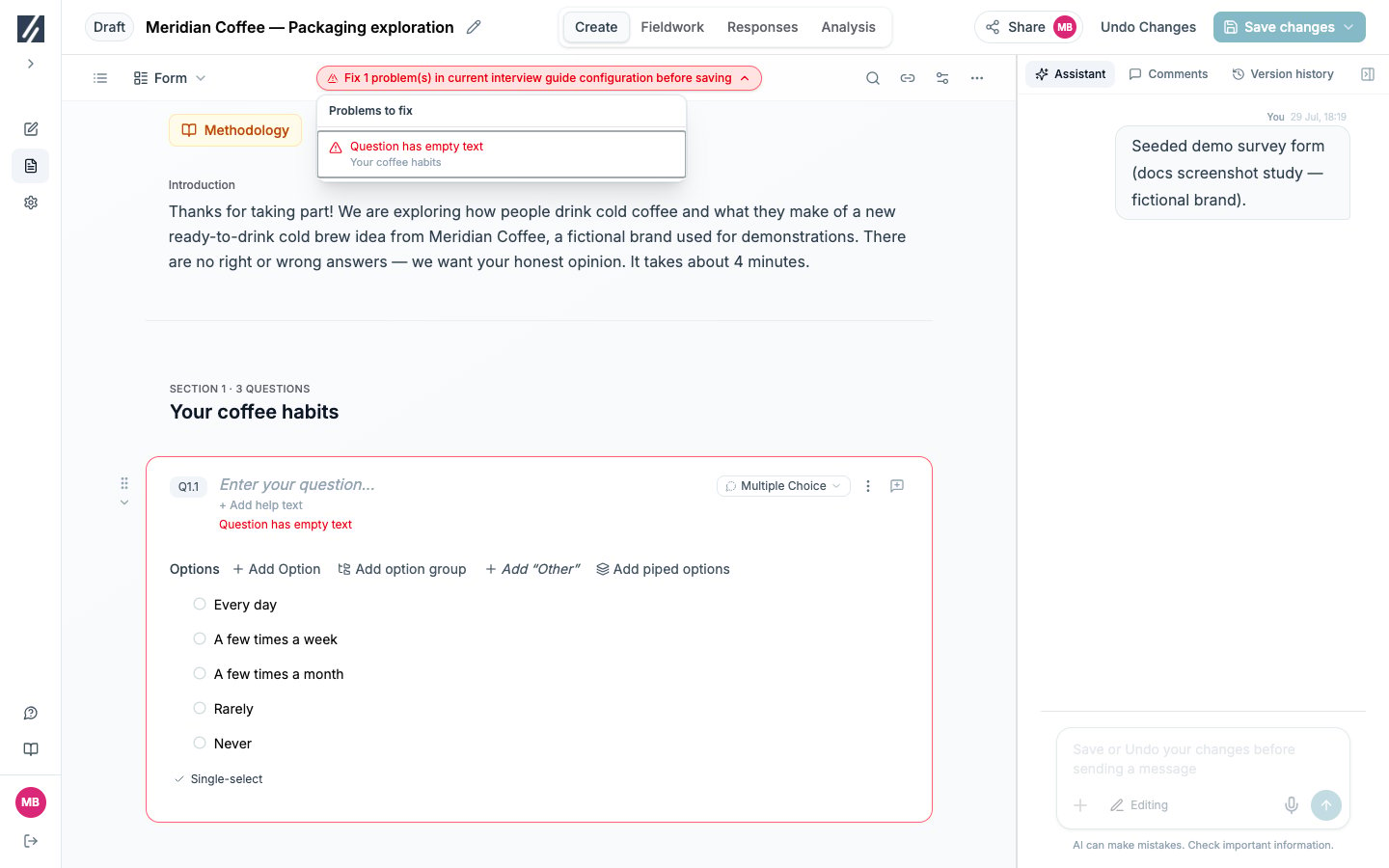 Resolve the entries until the control disappears, then open the **Save changes** menu. A disabled save control can also mean that nothing has changed or the assistant is still processing.
## Resolve missing content
| Message | Resolution |
| ------------------------------------------- | ------------------------------------------------------- |
| **Question has empty text** | Enter the participant-facing question text. |
| **Multiple choice question has no options** | Add answer options or select a different question type. |
| **Matrix question has no rows** | Add the items participants will rate. |
| **Matrix question has no column options** | Add the scale or answer columns. |
| **Section has an empty title** | Enter a section title in place of the placeholder. |
| **Section has no questions** | Add a question or remove the unused section. |
| **Some options are missing text** | Complete or delete each blank option. |
| **Some matrix rows are missing text** | Complete or delete each blank row. |
## Review settings that do not match the type
Changing a question type can leave an incompatible setting behind. These messages are warnings rather than blocking errors.
| Message | Resolution |
| -------------------------------------------------------------------------- | ---------------------------------------------------------------- |
| **Currency is only applicable to numeric questions** | Turn off the currency setting or return the question to Numeric. |
| **Max selections is only applicable when multiple selections are allowed** | Turn on **Multi-select** or clear **Max Selections**. |
When the form is saved, settings that cannot apply to the selected type are removed.
## Repair logic references
| Problem | Resolution |
| ----------------------------------------- | --------------------------------------------------------------------------------- |
| A condition references its own question | Select a question that appears earlier in the participant journey. |
| A condition row is incomplete | Choose the missing question, operator, or value, or delete the row. |
| A jump has no condition | Add the condition that activates it or remove the jump. |
| A jump destination no longer exists | Select a current question or section. |
| A jump points backward | Select a later destination. Use conditional display to hide intermediate content. |
| A jump points inside a randomized block | Move the destination outside that block or remove the block randomization. |
| An item appears in several blocks | Keep the item in one block and remove its other assignments. |
| An end-survey rule is empty or incomplete | Finish the rule or remove it. |
See [Configure logic and piping](/building-your-study/advanced-logic) for the controls behind these messages.
A text pipe from a concept-loop question into a question outside the loop has no single value and blocks saving. Move the dependent text inside the loop or ask for the source value outside it.
## Repair a quota reference
If a saved quota uses an option that was removed from its screening question, the form can save but fieldwork cannot launch with that quota. Open **Quotas, panels & links**, edit the quota, and assign each target to an option that still exists.
## Check custom-code questions
A custom renderer is checked when it is saved with the form. Resolve the error reported by the editor or problem list:
* Fix syntax and type errors in **Code**.
* Remove imports other than `react` and `@deepfield/question-kit`.
* Declare every earlier answer read by the component under **Advanced — inputs & text**.
* Use unique, non-empty keys for participant-facing text.
* Answer the question in **Preview** and confirm that it produces the value shape required by the underlying question type. Then use **Test this question** to verify the saved renderer with the study’s routing; Preview uses sample inputs.
See [Build a custom question interface](/building-your-study/custom-question-interfaces) for the full workflow.
## Resolve publishing blockers
Publishing also requires:
* No pending questionnaire changes. Save them or select **Undo Changes**.
* Every translation to be current. Open **Translations**, complete the update, review it, and save it.
* A valid panel and launch configuration.
## Check the result
The blocking problem list is empty and the form saves. Run Flow coverage and a participant test next; structural validation does not verify the meaning of questions or every participant experience.
## Related
* [Edit and save your survey](/building-your-study/survey-editor)
* [Configure logic and piping](/building-your-study/advanced-logic)
* [Translate your survey](/translations/multilingual-studies)
* [Test and publish a study](/recruiting/testing-publishing)
Resolve the entries until the control disappears, then open the **Save changes** menu. A disabled save control can also mean that nothing has changed or the assistant is still processing.
## Resolve missing content
| Message | Resolution |
| ------------------------------------------- | ------------------------------------------------------- |
| **Question has empty text** | Enter the participant-facing question text. |
| **Multiple choice question has no options** | Add answer options or select a different question type. |
| **Matrix question has no rows** | Add the items participants will rate. |
| **Matrix question has no column options** | Add the scale or answer columns. |
| **Section has an empty title** | Enter a section title in place of the placeholder. |
| **Section has no questions** | Add a question or remove the unused section. |
| **Some options are missing text** | Complete or delete each blank option. |
| **Some matrix rows are missing text** | Complete or delete each blank row. |
## Review settings that do not match the type
Changing a question type can leave an incompatible setting behind. These messages are warnings rather than blocking errors.
| Message | Resolution |
| -------------------------------------------------------------------------- | ---------------------------------------------------------------- |
| **Currency is only applicable to numeric questions** | Turn off the currency setting or return the question to Numeric. |
| **Max selections is only applicable when multiple selections are allowed** | Turn on **Multi-select** or clear **Max Selections**. |
When the form is saved, settings that cannot apply to the selected type are removed.
## Repair logic references
| Problem | Resolution |
| ----------------------------------------- | --------------------------------------------------------------------------------- |
| A condition references its own question | Select a question that appears earlier in the participant journey. |
| A condition row is incomplete | Choose the missing question, operator, or value, or delete the row. |
| A jump has no condition | Add the condition that activates it or remove the jump. |
| A jump destination no longer exists | Select a current question or section. |
| A jump points backward | Select a later destination. Use conditional display to hide intermediate content. |
| A jump points inside a randomized block | Move the destination outside that block or remove the block randomization. |
| An item appears in several blocks | Keep the item in one block and remove its other assignments. |
| An end-survey rule is empty or incomplete | Finish the rule or remove it. |
See [Configure logic and piping](/building-your-study/advanced-logic) for the controls behind these messages.
A text pipe from a concept-loop question into a question outside the loop has no single value and blocks saving. Move the dependent text inside the loop or ask for the source value outside it.
## Repair a quota reference
If a saved quota uses an option that was removed from its screening question, the form can save but fieldwork cannot launch with that quota. Open **Quotas, panels & links**, edit the quota, and assign each target to an option that still exists.
## Check custom-code questions
A custom renderer is checked when it is saved with the form. Resolve the error reported by the editor or problem list:
* Fix syntax and type errors in **Code**.
* Remove imports other than `react` and `@deepfield/question-kit`.
* Declare every earlier answer read by the component under **Advanced — inputs & text**.
* Use unique, non-empty keys for participant-facing text.
* Answer the question in **Preview** and confirm that it produces the value shape required by the underlying question type. Then use **Test this question** to verify the saved renderer with the study’s routing; Preview uses sample inputs.
See [Build a custom question interface](/building-your-study/custom-question-interfaces) for the full workflow.
## Resolve publishing blockers
Publishing also requires:
* No pending questionnaire changes. Save them or select **Undo Changes**.
* Every translation to be current. Open **Translations**, complete the update, review it, and save it.
* A valid panel and launch configuration.
## Check the result
The blocking problem list is empty and the form saves. Run Flow coverage and a participant test next; structural validation does not verify the meaning of questions or every participant experience.
## Related
* [Edit and save your survey](/building-your-study/survey-editor)
* [Configure logic and piping](/building-your-study/advanced-logic)
* [Translate your survey](/translations/multilingual-studies)
* [Test and publish a study](/recruiting/testing-publishing)