> ## Documentation Index
> Fetch the complete documentation index at: https://support.deepfield-ai.com/llms.txt
> Use this file to discover all available pages before exploring further.
# Create a derived variable
> Define reusable categories or numbers, test their inputs, and verify the resulting values.
A derived variable calculates a value from closed-question answers. Use it to define a reusable segment or numeric result. Before you start, save the source questions and decide the result for every case, including missing inputs.
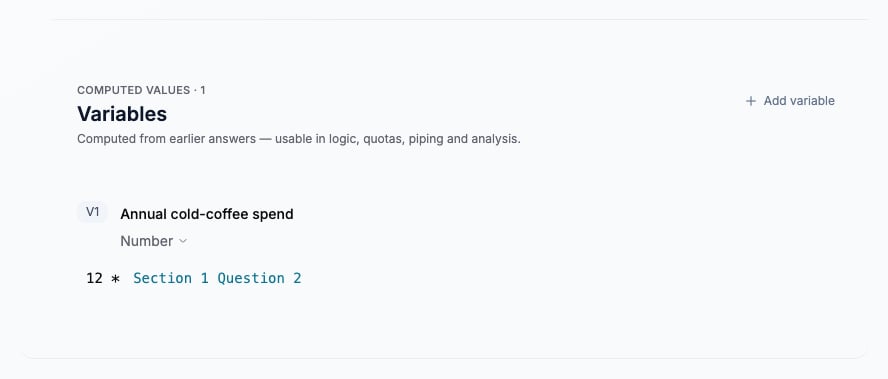
In **Create**, scroll to **Variables** below the questionnaire, then select **Add variable**. If the section is hidden, select **Add variable section**.
Name the variable and choose **Categories** or **Number**. For a category result, define the categories before assigning cases.
Enter a formula for a numeric variable. To use ordered cases, open **Variable settings → Set with rules** and define the conditions and **Otherwise** result. Category variables use rules to assign categories.
Save the questionnaire and generate a participant test link from **Test**. Repeat the test with inputs for each case, values at boundaries, and a missing source where skipping is allowed. Compare the variable column in Responses with the expected result.
Save the questionnaire, complete a participant test, and enable the variable column in Responses. Confirm that the saved value matches the source answers.
 ## Order cases deliberately
For a frequency segment, define regular cold-coffee drinkers from the saved frequency choices and use Otherwise for the remaining cases. Put more specific cases before broader cases that would also match. Do not label an unanswered source as a substantive answer without an explicit rule.
## Use the variable in the study
Select the variable where the relevant condition, piping, or analysis control offers it. Its inputs must be available before participant-facing logic uses it. Quota controls enforce their own eligibility restrictions; a variable appearing in analysis does not make it a valid quota source.
If you add a **Screening** through **Variable settings**, screening waits until the required inputs have been answered. Test both an excluded case and a case that continues.
## Order cases deliberately
For a frequency segment, define regular cold-coffee drinkers from the saved frequency choices and use Otherwise for the remaining cases. Put more specific cases before broader cases that would also match. Do not label an unanswered source as a substantive answer without an explicit rule.
## Use the variable in the study
Select the variable where the relevant condition, piping, or analysis control offers it. Its inputs must be available before participant-facing logic uses it. Quota controls enforce their own eligibility restrictions; a variable appearing in analysis does not make it a valid quota source.
If you add a **Screening** through **Variable settings**, screening waits until the required inputs have been answered. Test both an excluded case and a case that continues.
 ## Change a variable after collection
In Testing and live studies, open **Analysis → Analysis plan → New variable** or **Manage variables**. Review the calculation before saving. Variables referenced by live routing, screening, piping, or quotas are locked. In Draft, use the study builder.
The Plan assistant can also propose a variable. Review its definition, then select **Add to the study** or **Edit**; the proposal is not saved before your confirmation. Select a saved variable explicitly in the plan where needed.
Wait for variable calculations to finish before generation. Check existing response values and dependent charts, regenerate the plan outputs, and verify their bases.
## Related
* [Reuse earlier answers](/building-your-study/answer-piping)
* [Configure conditions and routing](/building-your-study/advanced-logic)
* [Monitor responses](/responses/monitoring-responses)
* [Build and organize charts](/analysis/charts-library)
## Change a variable after collection
In Testing and live studies, open **Analysis → Analysis plan → New variable** or **Manage variables**. Review the calculation before saving. Variables referenced by live routing, screening, piping, or quotas are locked. In Draft, use the study builder.
The Plan assistant can also propose a variable. Review its definition, then select **Add to the study** or **Edit**; the proposal is not saved before your confirmation. Select a saved variable explicitly in the plan where needed.
Wait for variable calculations to finish before generation. Check existing response values and dependent charts, regenerate the plan outputs, and verify their bases.
## Related
* [Reuse earlier answers](/building-your-study/answer-piping)
* [Configure conditions and routing](/building-your-study/advanced-logic)
* [Monitor responses](/responses/monitoring-responses)
* [Build and organize charts](/analysis/charts-library)