> ## Documentation Index
> Fetch the complete documentation index at: https://support.deepfield-ai.com/llms.txt
> Use this file to discover all available pages before exploring further.
# Review usage and credits
> Check the organization's credit balance and understand entries in its transaction history.
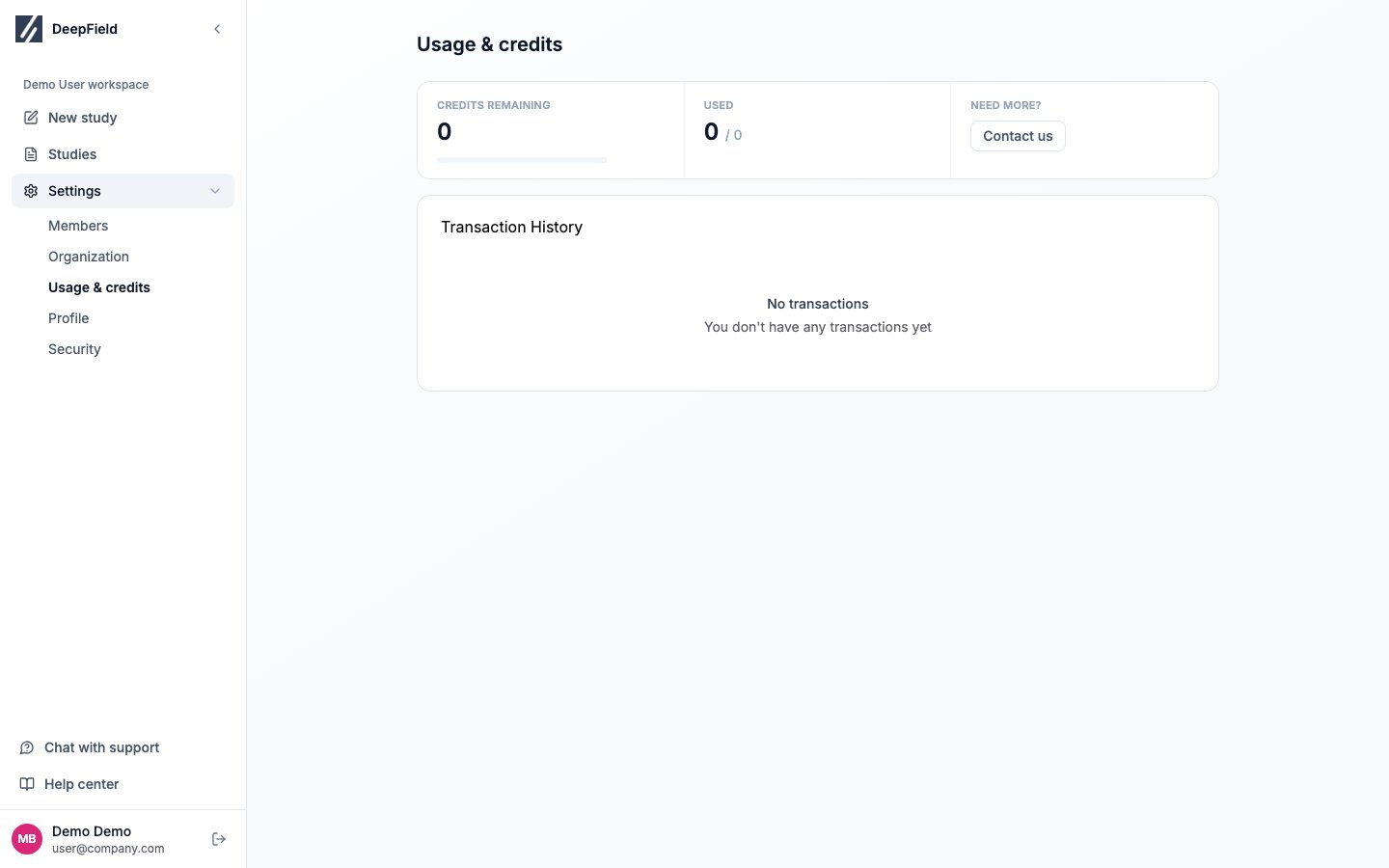
Open **Settings → Usage & credits** to see the organization's available credits and transaction history. This page reports usage; purchases, invoices, and payment methods are handled through your DeepField contact or support.
Collaborator accounts cannot open Workspace or Usage & credits. Ask an Admin or Researcher in your organization for the current balance if you do not see the page.
## Before you start
Use an Admin or Researcher account to open organization usage. Have the transaction date or planned study estimate available.
## Read the balance
The summary displays:
* **Credits Remaining**: the amount currently available to the organization
* **Used**: the amount consumed
* A usage meter showing the relationship between the two
Check the available balance before publishing a large recruited study. The recruiting area shows an estimated cost after the audience and screening criteria are configured.
 ## Read the transaction history
| Column | Meaning |
| --------------- | --------------------------------------------------------------- |
| **Date** | When the credit movement was recorded. |
| **Description** | The available explanation for the transaction. |
| **Amount** | Credits added or deducted. Added credits use a positive amount. |
The history is organization-wide and paginates when it contains many entries. It does not currently provide filters, export, or a structured per-study breakdown.
If a description is not enough to identify a transaction, contact support with its date and amount. Avoid sending sensitive participant data with the request.
## Request credits or billing documents
Select **Need more?** or contact support for:
* A credit top-up
* An invoice or receipt
* A balance correction
* Payment-method or subscription information
There is no self-service checkout or invoice download on the Usage & credits page.
## Estimate study cost before launch
A study is billed in two parts, and Fieldwork shows them separately.
**Coding fees are charged in credits.** They cover programming and analysis of the questionnaire, its fields, its languages, and a price per completed response. Compare the coding total with **Credits Remaining** before publishing a large study.
**Recruiting is charged in euros**, and only when DeepField supplies the respondents. It does not draw on the credit balance.
Configure the audience, screening rules, and sample target in the study's recruiting area, then review both figures. Some audiences are estimated by the DeepField team: request the estimate from the panel and wait for the price and feasibility before planning the launch. See [Configure your audience](/recruiting/panels-demographics).
## Check the result
Identify the relevant transaction by date and amount, or compare the current credit balance with the saved coding total. Keep any unresolved discrepancy with your support request.
## Related
* [Configure panels and demographics](/recruiting/panels-demographics)
* [Test and publish your study](/recruiting/testing-publishing)
* [Manage workspace members](/account-settings/team-workspace)
* [Get help](/account-settings/getting-help)
## Read the transaction history
| Column | Meaning |
| --------------- | --------------------------------------------------------------- |
| **Date** | When the credit movement was recorded. |
| **Description** | The available explanation for the transaction. |
| **Amount** | Credits added or deducted. Added credits use a positive amount. |
The history is organization-wide and paginates when it contains many entries. It does not currently provide filters, export, or a structured per-study breakdown.
If a description is not enough to identify a transaction, contact support with its date and amount. Avoid sending sensitive participant data with the request.
## Request credits or billing documents
Select **Need more?** or contact support for:
* A credit top-up
* An invoice or receipt
* A balance correction
* Payment-method or subscription information
There is no self-service checkout or invoice download on the Usage & credits page.
## Estimate study cost before launch
A study is billed in two parts, and Fieldwork shows them separately.
**Coding fees are charged in credits.** They cover programming and analysis of the questionnaire, its fields, its languages, and a price per completed response. Compare the coding total with **Credits Remaining** before publishing a large study.
**Recruiting is charged in euros**, and only when DeepField supplies the respondents. It does not draw on the credit balance.
Configure the audience, screening rules, and sample target in the study's recruiting area, then review both figures. Some audiences are estimated by the DeepField team: request the estimate from the panel and wait for the price and feasibility before planning the launch. See [Configure your audience](/recruiting/panels-demographics).
## Check the result
Identify the relevant transaction by date and amount, or compare the current credit balance with the saved coding total. Keep any unresolved discrepancy with your support request.
## Related
* [Configure panels and demographics](/recruiting/panels-demographics)
* [Test and publish your study](/recruiting/testing-publishing)
* [Manage workspace members](/account-settings/team-workspace)
* [Get help](/account-settings/getting-help)